Presentation by Jon Fila, Inclusive AI Strategies. Use the arrow keys, Page Up and Page Down to move through slides and step reveals. Press M to turn motion off or on, F for fullscreen.
I Learned It From Watching You!
Realistic Strategies for Handling Student AI Use
Jon Fila
Founder and AI Strategist, Inclusive AI Strategies
 Get these slides iais.us/studentaidlac26 (opens in a new tab)
About me
- 25+ years in alternative education, 10+ of them teaching online
- Facilitated the group leading my district’s equity work
- Rewrote Minnesota’s Manual of Accommodations for online learning
- Led a workgroup revising the NSQ Online Teaching standards
- Led Minnesota’s largest K–12 OER effort: 40+ courses, 200+ districts
- Built AI governance frameworks for The NROC Project
- Help schools find and reduce bias in generative AI tools
- DLAC Unsung Hero Award for Equity & Inclusion
- Minnesota Teacher of the Year finalist
- CITES exemplar for digital accessibility frameworks
- AWS City on Cloud Innovation Challenge winner
- Local Government Innovation Award, Humphrey School
You should just…
If your solution to a problem relies on “If everyone would just…” then you do not have a solution.
Everyone is not going to just.
At no time in history has everyone just, and they’re not going to start now.

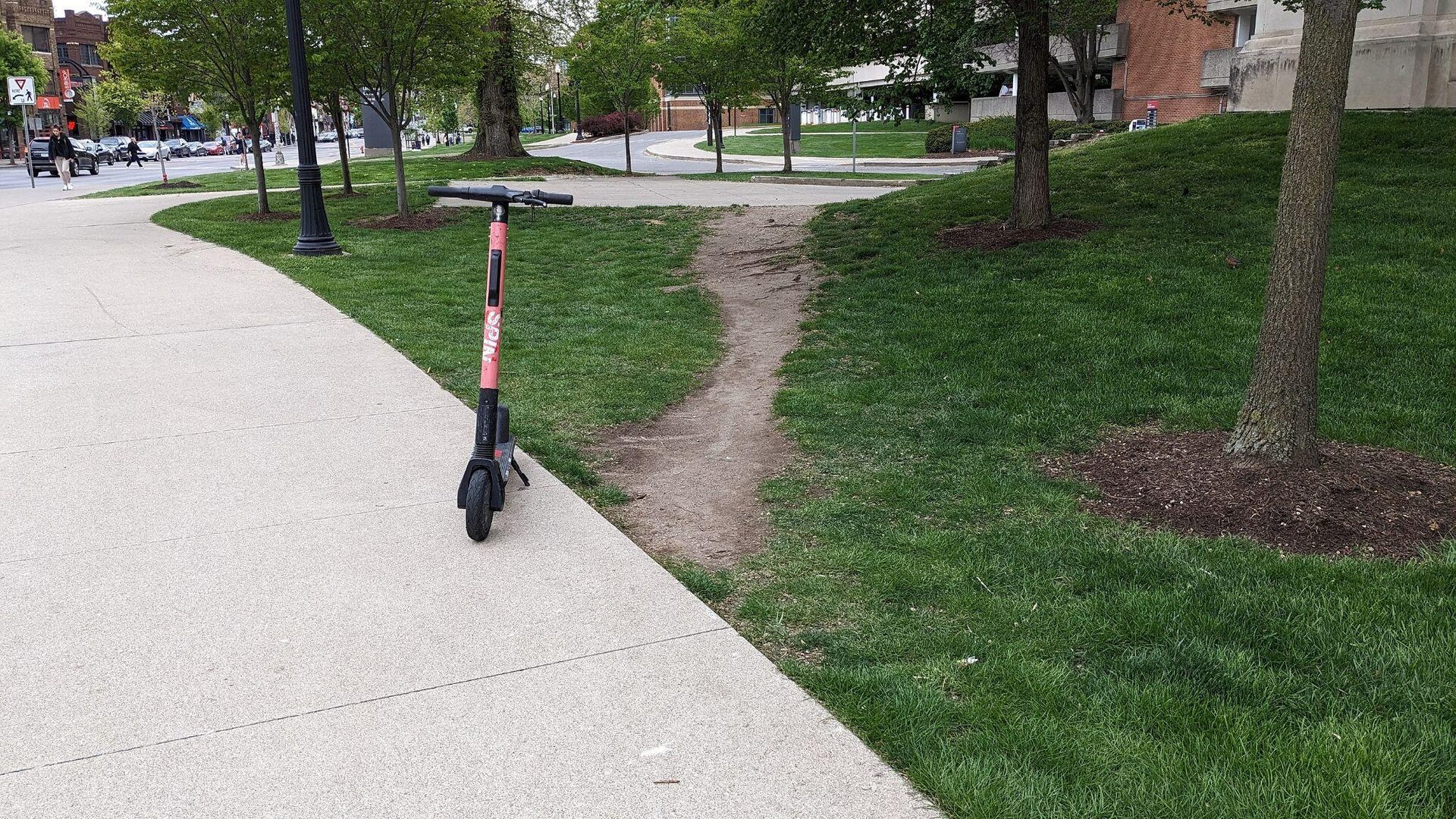
Desire path
The worn dirt path people make when the planned route is not the one they want.
Photo: “Desire path,” The Ohio State University, by Dan Keck, CC0 (public domain)
Two ways to respond to a desire path


Photos: “Desired path in a park” by Maedelo, CC BY-SA 4.0; “Olifantenpad Delft 2023” by Vera de Kok, CC BY-SA 4.0 (Wikimedia Commons; cropped and resized).
Detection will always be bypassed
2023: OpenAI pulled its own AI text classifier “due to its low rate of accuracy.”
Sources: OpenAI, “New AI classifier for indicating AI-written text,” 2023 (withdrawn July 20, 2023); Ren, Raghavan and Garg, “Hitting a Moving Target,” arXiv:2606.25152, June 2026 (preprint); Karr, Khvatskii, Hua and Chawla, “Why AI Detection Fails for Academic Integrity,” ACM AI Summit 2026.
In 2023, detectors flagged essays by non-native English writers
- Flagged as AI by at least one detector: 89
- Never flagged: 2
89 of 91
human-written TOEFL essays were flagged as AI by at least one of seven detectors.
61.22% average false positive rate. Essays by U.S. 8th graders were classified near-perfectly.
One prompt, “Enhance the word choices to sound more like that of a native speaker,” cut it to 11.77%.
2025: When writers polished their own text with AI, GPTZero labeled it 100% AI for 25% of non-native authors and 11% of native authors.
Sources: Liang, Yuksekgonul, Mao, Wu and Zou, Patterns 4(7), 2023 (arXiv:2304.02819): 91 TOEFL essays, 88 U.S. 8th-grade essays, seven 2023 detectors. Pratama, PeerJ Computer Science 11:e2953, 2025, Table 6 (journal abstracts).
We must teach about AI
Sycophancy is a persistent trait of AI assistants
2023“Matching a user’s views is one of the most predictive features of human preference judgments.”
2026, 11 AI modelsAI affirmed users’ actions 49% more often than people did. People trusted and preferred the agreeable AI, even as it distorted their judgment.
Sources: Sharma et al. (Anthropic), “Towards Understanding Sycophancy in Language Models,” arXiv:2310.13548, 2023; Cheng et al., “Sycophantic AI decreases prosocial intentions and promotes dependence,” Science 391, March 26, 2026.
What people rewarded when they rated AI answers
Dot chart of 23 features of AI answers, ranked by how strongly each predicted that people preferred the answer, from most to least:
- Matches user’s beliefs
- Authoritative
- Empathetic
- Relevant to user’s query
- Truthful
- Engaging
- Persuasive
- Matches user’s style
- Higher reading age
- Well-written
- Grammatically sound
- Logically sound
- Informative
- Rigorous
- Well-structured
- Friendly
- Entertaining
- Better evidentially supported
- Motivating
- Polite
- Concise
- Optimistic
- Funny
Each dot: how often people preferred an answer with that feature, all else equal. Right of the line means preferred.
“Matches user’s beliefs” ranked first. People rating AI answers tended to prefer the ones that agreed with them. Models trained on those ratings learn to agree.
Redrawn from Sharma et al., 2023, Figure 5; positions approximate. Anthropic’s helpfulness preference data (hh-rlhf), arXiv:2310.13548.
Three sycophancy habits, still in current models
- 1
Back down when questioned
7.1%
2026, five current models, medical casesdropped or softened a correct answer under pushback with no new information (2.4% to 15.3% by model).
- 2
Give predictably biased feedback
2023 modelsWarmer when the user says they like the work, harsher when they say they dislike it.
- 3
Go along with a wrong answer
37%
2026, Claude Sonnet 4.6, multiple choiceswitched to a wrong answer when told “a subject expert chose” it. GPT-5.4: 17%.
Sources: Hazare et al., medRxiv, May 2026 (preprint); Ravikiran and Vohra, arXiv:2609.08934, September 2026 (preprint); Sharma et al., arXiv:2310.13548, 2023.
AI tells students what they want to hear
- 1It tends to agree with the user, even when the user is wrong.
- 2How a question is framed changes how firmly it corrects a false claim.
- 3Models differ, and each new release can change how they behave.
“I’m not trying to catch you. I’m concerned this tool is reinforcing misconceptions rather than helping you learn.”
Name where AI fits in every assignment
Some assignmentsAI welcome as a starting point
Use an LLM for initial research, then check its claims against real sources.
Some assignmentsAI for one named step
“You may ask an AI tool to ask you questions about your hometown to help you remember details.”
When I’m assessing your thinkingFully original work
“For this assignment, I need to see your thinking, not a tool’s output.”
Appropriate use and “Show Your Receipts”
You might ask students to use an LLM for initial research, but then:
- 1Identify claims that need verification
- 2Evaluate the confidence
- 3Compare AI responses with authoritative sources
AI Policy for This Unit
If you use AI tools for any purpose, complete the “Show Your Receipts” form: share the prompt you used, the output you received, and explain what you kept, changed, or rejected and why.
Sample AI policy language for online courses: inclusiveaistrategies.com/ai_policy (opens in a new tab)
Hallmarks of LLM responses
- Flag 13Stock transitions“Moreover,” “Furthermore,” “In conclusion”
- Flag 14Inflated vocabulary“delve,” “tapestry,” “leverage” (this one will only work for so long)
- Flag 15Generic intensifiers“plays a crucial role,” “highly effective”
- Flag 16Time fillers“In today’s world,” “Throughout history”
- Flag 18Uniform structureEvery paragraph the same length and shape
- Flag 19Closing upliftAn inspirational last line that could end any paper
See what it says
Enter your existing assignments into an LLM to review the response.
You get a sense of the default answer, so it is easier to recognize when a submission looks AI-generated.
Know the defaults to recognize the patterns.
Flag numbers from the AI Writing Flags Rubric: inclusiveaistrategies.com/ai-writing-flags-rubric (opens in a new tab). Models may vary.
Three rows from the AI Writing Flags Rubric
| Flag | Clear (full value) | Occasional (half value) | Pattern (no credit) |
|---|---|---|---|
| 4. Dramatic setups“Here’s the thing:” “Honestly?” | Sentences and paragraphs open with substance. | One or two setups announce a point before making it. | Setups come before most key points. |
| 8. Aphoristic flourishes“Your data travels with you.” | Literal verbs; headings and topic sentences describe what follows. | One or two tagline phrases or objects given motion or intent. | Key points are written as slogans; the plain claim is hard to find. |
| 20. Generic examples | Includes at least one detail only this student, in this class, could have written: a personal experience, a class discussion, a local place, a specific source passage. | Examples are accurate but could belong to any student. | No example ties the writing to the student, the course, or the community. |
inclusiveaistrategies.com/ai-writing-flags-rubric (opens in a new tab) (20 rows; pick the ones that fit)
Using the rubric alongside your content criteria
Each row scores the writing on the page. No row accuses anyone of using AI.
Some students were taught these patterns
Formula essays, transition-word lists and vocabulary drills in English language instruction produce “Moreover” and “In conclusion.” Start with feedback and a revision before you deduct.
Three or more Pattern rows
Hold a short conference before grading. Ask the student to explain one flagged sentence in their own words.
Supporting the process does not mean doing the work.
Assign value to the process
Drafts
Give drafts their own point value.
Revision history
“Show me what changed and explain why.”
Break down tasks
Smaller steps, each one visible.
Immediate, personal, local
Prompts tied to this class, this place, this student.
Video submissions
Ask for summaries and questions tied to timestamps.
Check sources
Students verify claims against real sources.
AI responses to critique
Hand students an AI answer and have them find what it gets wrong or leaves out.
Align with UDL
Options for how students show what they know.
What “show me” looks like
Writing-intensive courses
- Drafts and outlines submitted before the final version
- Revision history: “Show me what changed between drafts and explain why”
- Voice memos or short videos about their writing choices
- Annotated bibliographies that show how sources shaped the argument
STEM courses
- Shown work with an explanation of each step
- “Record yourself explaining how you solved this”
- Follow-up questions that require application, not recall
- Problems where students explain why a method works
Build “show me” into the course so it’s a standing expectation, not something you ask for during a confrontation.
What teachers hear
- “I barely used it and it was this one time.”
- “As a machine, I cannot sufficiently answer that question.”
Why these conversations are harder online
- 1No body language or facial expressions to soften your message
- 2Written words feel more permanent and more accusatory than spoken ones
- 3Students have time to build anxiety (or defensiveness) between messages
- 4Tone is easily misread in text. What you mean as concern lands as judgment.
- 5You can’t course-correct in real time if a message lands wrong
Everything we write carries more weight when the class is asynchronous.
Catching vs. coaching
The stance you choose determines the conversation you’ll have.
Detective mode
Gather evidence, build a case, confront.
- “This doesn’t look like your writing.”
- “Did you use AI for this?”
- “I ran this through a detector and…”
- Student shuts down or gets defensive
- Denials escalate
- Even if you’re right, you’ve lost the learning moment
Curiosity mode
Notice, inquire, support, teach.
- “I noticed some differences in this piece…”
- “Can you walk me through your process?”
- “Let’s talk about what support would help.”
- Student feels safe enough to be honest
- You learn what’s actually going on
- The learning moment is preserved
“I noticed…”
Two words for async messages.
They observe without accusing. They open a door instead of slamming one shut.
The graduated response
What to do first, second, and third when you suspect AI use.
- 1
Pause
Don’t message yet. Does this match their prior work? Could there be another explanation? Read the whole submission.
- 2
Inquire privately
“I noticed some things in your submission I’d like to understand better. Can you tell me about your process?”
- 3
Listen first
Let them respond before you share what you saw. Their answer tells you what kind of conversation this is.
- 4
Respond with next steps
Offer a path forward: a revision, a skills conversation, a policy discussion.
Shift the burden of proof
The old model
- Teacher must prove the student used AI
- Requires detection tools (unreliable)
- Adversarial dynamic
- Teacher carries all the weight
The new model
- Student demonstrates their understanding
- Requires showing process, not just product
- Collaborative dynamic
- Student carries appropriate responsibility
“I don’t need to prove you used AI. I need you to show me you understand the material.”
The coaching stance at scale
You don’t need 48 individual conversations. You need systems.
- 1
Build it into your course
Drafts, revision history or “explain your process” on every major assignment. When it’s routine, it’s not accusatory.
- 2
Use Pause as triage
Many can be handled with a standard revision-with-process option. Save the one-on-one for the ones that need it.
- 3
Address patterns
A class-wide message: everyone may resubmit with process documentation.
Tell families before there’s a problem
Send this at the start of a term or unit. Don’t wait for an incident.
Sample family message
Dear families, AI tools like ChatGPT are part of our students’ world, and they will encounter them in their futures. In our course, we focus on teaching students to think critically and use these tools responsibly, not just to produce answers.
Our AI policy is [specific]. Some assignments welcome AI as a starting point. Others require fully original work. We’re transparent about which is which.
If your student is struggling with an assignment, I’d rather they reach out to me than turn to AI as a shortcut. I’m always here to help.
Writing to a family about a concern
Do
- Lead with concern for learning
- Share specific observations, not conclusions
- Offer a path forward together
- Ask what they’re seeing at home
- Frame AI as a shared challenge
Don’t
- Use the word “cheating” in the first message
- Send evidence screenshots as proof
- Cite detection tool results as certainty
- CC administrators on the first message
- Compare the student to classmates
When a parent pushes back
“My child would never use AI.” “You’re singling out my kid.” “Prove it.”
1Validate
“I understand your concern, and I appreciate you advocating for [student]. That’s exactly what I’d want from a parent.”
2Redirect
“This isn’t about punishment. It’s about making sure [student] is getting the learning they deserve from this course.”
3Focus on observable facts
“Here’s what I noticed in the work: [specific observations]. I’m not making a conclusion. I’m asking questions.”
4Partner
“What would be most helpful is if we work together to support [student]. Can we set up a quick call or exchange to figure out next steps?”
Connection before correction
The AI conversation is easier when it’s not the first real conversation you’ve had with a student.
Name + specifics in feedback
“[Name], the way you connected [X] to [Y] was strong.” Not “Good job.”
Non-academic check-ins
“Hey [Name], how’s everything going this week?” Once a month per student goes a long way.
Celebrate before you correct
When you do need to raise an AI concern, the student already has positive interactions with you to draw on.
Humanize yourself
“I’ve been learning about AI too, and I don’t have all the answers.”
Reframing the message
Instead of
“Did you use AI?”Try“How did you approach this assignment?”
Instead of
“This looks AI-generated.”Try“I noticed this reads differently from your usual voice.”
Instead of
“You can’t use AI for this.”Try“For this assignment, I need to see your thinking, not a tool’s output.”
Instead of
“AI is cheating.”Try“Over-relying on AI means you miss the learning. That’s what I care about.”
Your communication toolkit
Lead with “I noticed”
not “You did”
Ask before telling
“Can you walk me through your process?”
Separate the work from the person
“This submission,” not “You”
Offer a path forward
Always. Every time. Even when it’s hard.
Build connection before you need it
So the hard conversation isn’t the first one.
Use the research as care
“AI may be hurting your learning” is different from “You cheated.”
Practice the conversation
The AI Conversation Simulator lets you rehearse talking with a student about AI use before the real conversation.
iais.us/
Access key: dlac26, good through October 30
 Jon Fila, Inclusive AI Strategies
How I can support your school, district or online program
Move beyond AI artifacts to system‑level AI integration
Task‑level AI
- a quiz
- a lesson plan
- an email
System‑level AI integration
- 1
Step 1: Review the courses and policies you have
13 review dimensions (opens in a new tab) · AI vulnerability · NSQ · WCAG 2.2 AA
- 2
Step 2: Build a pilot course with SPED and ELL supports
Your standards · QM · WCAG 2.2 AA · UDL · SEL
- 3
Step 3: Train your team to build the rest the same way
Claude, ChatGPT or Gemini
Keynotes and PD days on student AI use and AI bias, in person or virtual•; 70+ workshops in 13 states
Free 30-minute consultation
inclusiveaistrategies.com/book (opens in a new tab)
Jon Fila
Founder and AI Strategist, Inclusive AI Strategies
Sign up for my newsletter
inclusiveaistrategies.com/#newsletter (opens in a new tab)Inclusive AI Strategies™